Voice Mail Hacking
by Night Ranger
I decided to write this text file because I received numerous requests for Voice Mailboxes (VMB) from people. VMBs are quite easy to hack, but if one doesn't know where to start it can be hard. To the best of my knowledge, this is the most complete text on hacking VMB systems.
VMBs have become a very popular way for hackers to get in touch with each other and share information. Probably the main reason for this is their simplicity and availability. Anyone can call a VMB regardless of their location or computer type. VMBs are easily accessible because most are toll-free numbers, unlike bulletin boards. Along with their advantages, they do have their disadvantages. Since they are easily accessible this means not only hackers and phreaks can get information from them, but feds and narcs as well. Often they do not last longer than a week when taken improperly. After reading this file and practicing the methods described, you should be able to hack voice mail systems with ease. With these thoughts in mind, let's get started.
Finding a VMB System
The first thing you need to do is find a virgin (unhacked) VMB system. If you hack on a system that already has hackers on it, your chance of finding a box is considerably less and it increases the chance that the system administrator will find the hacked boxes. To find a virgin system, you need to scan some 800 numbers until you find a VMB. A good idea is to take the number of a voice mail system you know, and scan the same exchange but not close to the number you have.
Finding Valid Boxes on the System
If you get a high quality recording (not an answering machine) then it is probably a VMB system. Try entering the number 100, the recording should stop. If it does not, you may have to enter a special key (such as *, #, 8, or 9) to enter the voice mail system. After entering 100 it should either connect you to something or do nothing.
If it does nothing, keep entering 0 until it does something. Count the number of digits you entered and this will tell you how many digits the boxes on the system are. You should note that many systems can have more than one box length depending on the first number you enter.
Example: Boxes starting with a six can be five digits while boxes starting with a seven can only be four. For this file we will assume you have found a four-digit system, which is pretty common. It should do one of the following things:
1.) Give you an error message, like "Mailbox xxxx is invalid."
2.) Ring the extension and possibly connect you to a mailbox if there's no answer.
3.) Connect you to mailbox xxxx.
If you get a valid mailbox then try some more numbers. Extensions usually have a VMB for when they are not at their extension. If you get an extension, move on. Where you find one box you will probably find more surrounding it. Sometimes a system will try to be sneaky and put one valid VMB per 10 numbers.
Example: Boxes would be at 105, 116, 121, etc. with none in between. Some systems start boxes at either 10 after a round number or 100 after, depending on whether it is a three or four box system.
For example, if you do not find any around 100, try 110 and if you do not find any around 1000 try 1100. The only way to be sure is to try every possible box number. This takes time but can be worth it.
Once you find a valid box (even if you do not know the passcode), there is a simple trick to use when scanning for boxes outside of a VMB so that it does not disconnect you after three invalid attempts. What you do is try two box numbers and then the third time enter a box number you know is valid. Then abort ( usually by pressing * or #) and it will start over again. From there you can keep repeating this until you find a box you can hack on.
Finding the Login Sequence
Different VMB systems have different login sequences (the way the VMB owner gets into his box). The most common way is to hit the pound # key from the main menu. This pound method works on most systems, including Octel ASPENs (more on specific systems later). It should respond with something like "Enter your mailbox" and then "Enter your passcode"
Some systems have the asterisk * key perform this function. Another login method is hitting a special key during the greeting (opening message) of the VMB.
On a CINDY or Q Voice Mail system you hit the zero (0) key during the greet and since you've already entered your mailbox number it will respond with "Enter your passcode".
If 0 doesn't do anything try # or *.
These previous two methods of login are the most common, but it is possible some systems will not respond to these commands. If this should happen, keep playing around with it and trying different keys. If for some reason you cannot find the login sequence, then save this system for later and move on.
Getting In
This is where the basic hacking skills become useful. When a system administrator creates a box for someone, they use what's called a default passcode. This same code is used for all the new boxes on the system, and often on other systems too. Once the legitimate owner logs into his new VMB, they are usually prompted to change the passcode, but not everyone realizes that someone will be trying to get into their mailbox and quite a few people leave their box with the default passcode or no passcode at all.
You should try all the default that are listed in the chart before giving up on a system. If none of the defaults work, try anything you think may be their passcode. Also remember that just because the system can have a four-digit passcode the VMB owner does not have to have use all four digits.
If you still cannot get into the box, either the box owner has a good passcode or the system uses a different default. In either case, move on to another box. If you seem to be having no luck, then come back to this system later. There are so many VMB systems that you should not spend too much time on one hard system.
Defaults Box Number Try Notes Box Number (BN) 3234 3234 Most Popular BN backwards 2351 1532 Popular BN + 0 323 3230 Popular with ASPENs Some additional defaults in order of most to least common are: 4-Digit 5-Digit 6-Digit Notes 0000 00000 000000 Most Popular 9999 99999 999999 Popular 1111 11111 111111 Popular 1234 12345 123456 Very Popular with Owners 4321 54321 654321 6789 56789 456789 9876 98765 987654 2222 22222 222222 3333 33333 333333 4444 44444 444444 5555 55555 555555 6666 66666 666666 7777 77777 777777 8888 88888 888888 |
If there's one thing I hate, it's an article that says "Hack into the system. Once you get in..." But unlike computer systems, VMB systems really are easy to get into. If you didn't get in, don't give up! Try another system and soon you will be in. I would say that 90% of all voice mail systems have a default listed above. All you have to do is find a box with one of the defaults.
Once You're In
The first thing you should do is listen to the messages in the box, if there are any. Take note of the dates the messages were left. If they are more than four weeks old, then it is pretty safe to assume the owner is not using his box. If there are any recent messages on it, you can assume he is currently using his box.
Never take a box in use. It will be deleted soon, and will alert the system administrator that people are hacking the system. This is the main reason VMB systems either go down, or tighten security. If you take a box that is not being used, it's probable no one will notice for quite a while.
Scanning Boxes From the Inside
From the main menu, see if there is an option to either send a message to another user or check receipt of a message. If there is you can search for virgin (unused) boxes) without being disconnected like you would from outside of a box. Virgin boxes have a "generic" greeting and name: "Mailbox xxx" or "Please leave your message for mailbox xxx..." Write down any boxes you find with a generic greeting or name, because they will probably have the default passcode.
Another sign of a virgin box is a name or greeting like "This mailbox is for ...' or a women's voice saying a man's name and vice versa, which is the system administrator's voice.
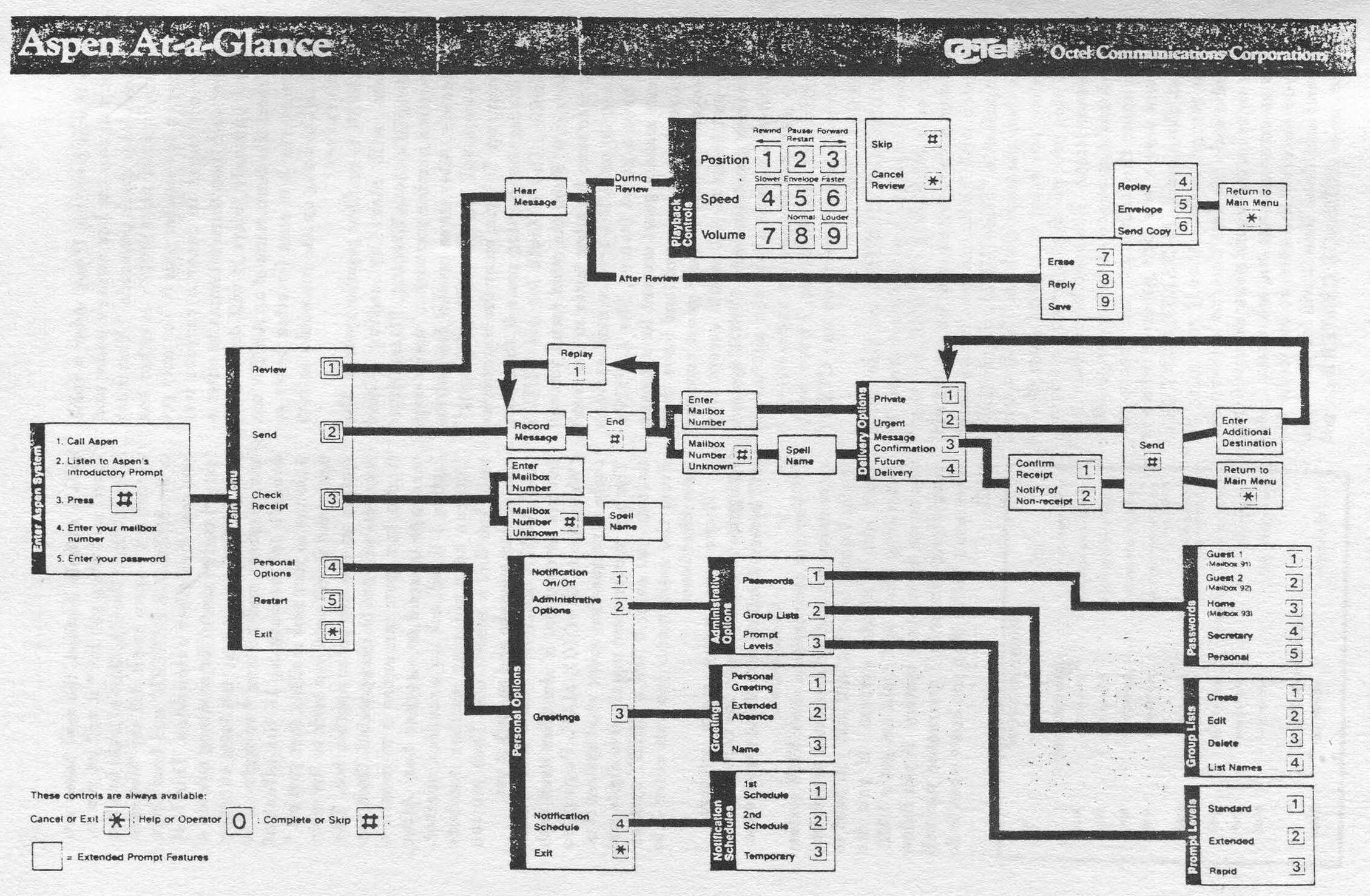
If the box does not have this feature, simply use the previous method of scanning boxes from the outside. For an example of interior scanning, when inside an ASPEN box, chose 3 from the main menu to check for receipt. It will respond with "Enter box number."
It is a good idea to start at a location you know there are boxes present and scan consecutively, noting any boxes with a "generic" greeting. If you enter an invalid box it will alert you and allow you to enter another. You can enter invalid box numbers forever, instead of the usual three incorrect attempts from outside a box.
Taking a Box
Now you need to find a box you can take over. Never take a box in use; it simply won't last. Deserted boxes (with messages from months ago) are the best and last the longest. Take these first.
New boxes have a chance of lasting, but if the person for whom the box was created tries to login, you'll probably lose it. If you find a box with the system administrator's voice saying either the greeting or name (quite common), keeping it that way will prolong the box life, especially the name.
This is the most important step in taking over a box!
Once you pick a box take over, watch it for at least three days before changing anything! Once you think it's not in use, then change only the passcode - nothing else! Then login frequently for two to three days to monitor the box and make sure no one is leaving messages in it. Once you are pretty sure it is deserted, change your greeting to something like "Sorry I'm not in right now, please leave your name and number and I'll get back to you."
Do not say "This is Night Ranger dudes..." because if someone hears that it's good as gone. Keep your generic greeting for one week. After that week, if there are no messages from legitimate people, you can make your greeting say whatever you want.
The whole process of getting a good VMB (that will last) takes about 7-10 days, the more time you take the better chance you have of keeping it for long time. If you take it over as soon as you get in, it'll probably last you less than a week. If you follow these instructions, chances are it will last for months. When you take some boxes, do not take too many at one time. You may need some to scan from later. Plus listening to the messages of the legitimate users can supply you with needed information, such as the company's name, type of company, security measures, etc.
System Identification
After you have become familiar with various systems, you will recognize them by their characteristic female (or male) voice and will know what defaults are most common and what tricks you can use. The following is a few of a few popular VMB systems.
ASPEN (Automated SPeech Exchange Network) is one of the best VMB systems with the most features. Many of them will allow you to have two greetings (a regular and an extended absence greeting), guest accounts, urgent or regular messages, and numerous other features.
ASPENs are easy to recognize because the female voice is very annoying and often identifies herself as ASPEN. When you dial up an ASPEN system, sometimes you have to enter an * to get into the VMB system. Once you're in, you hit # to login. The system will respond with "Mailbox number please?" If you enter an invalid mailbox the first time it will say "Mailbox xxx is invalid..." and the second time it will say "You dialed xxx, there is no such number..." and after a third incorrect entry it will hang up.
If you enter a valid box, it will say the box owner's name and "Please enter your passcode." The most common default for ASPENs is either box number or box number + 0.
You only get three attempts to enter a correct box number and then three attempts to enter a correct passcode until it will disconnect you. From the main menu of an ASPEN box you can enter 3 to scan for other boxes so you won't be hung up like you would from outside the box.
CINDY is another popular system. The system will start by saying "Good Morning/Afternoon/Evening. Please enter the mailbox number you wish..." and is easy to identify. After three invalid box entries the system will say "Good Day/Evening!" and hang up.
To login, enter the box number and during the greet press 0 then your passcode. The default for all Cindy systems is 0. From the main menu you can enter 6 to scan for other boxes so you won't be hung up.
CINDY voice mail systems also have a guest feature, like ASPENs. You can make a guest account for someone, and give them password, and leave them messages. To access their guest account, they just login as you would except they enter their guest passcode.
CINDY systems also have a feature where you can have it call a particular number and deliver a recorded message. However, I have yet to get this feature to work on any CINDY boxes that I have.
Nortel Message Center is also very popular, especially with direct dials. To login on a Message Center, hit the * key during the greet and the system will respond with "Hello [name]. Please enter your passcode."
These VMBs are very tricky with their passcode methods. The first trick is when you enter an invalid passcode it will stop you one digit after the maximum passcode length.
Example: If you enter 12345 and it gives you an error message you enter the fifth digit, that means the system uses a four-digit passcode, which is most common on Message Centers.
The second trick is that if you enter an invalid code the first time, no matter what you enter as the second passcode it will give you an error message and ask again. Then if you entered the correct passcode the second and third time it will let you login.
Also, most Message Centers do not have a default. Instead ,the new boxes are "open" and when you hit * it will let you in. After hitting * the first time to login a box you can hit * again and it will say "Welcome to the Message Center" and from there you can dial other extensions.
This last feature can be useful for scanning outside a box. To find a new box, just keep entering box numbers and hitting * to login. If it doesn't say something to the effect of welcome to your new mailbox then just hit * again and it will send you back to the main system so you can enter another box. This way you will not be disconnected.
Once you find a box, you can enter 6 to record a message to send to another box. After hitting 6 it will ask for a mailbox number. You can keep entering mailbox numbers until you find a generic one. Then you can cancel your message and go hack it out.
Q Voice Mail is a rather nice system but not as common. It identifies itself "Welcome to Q Voice Mail Paging" so there is no question about what system it is. The box numbers are usually five digits and to login you enter 0 like a CINDY system. From the main menu you can enter 3 to scan other boxes.
There are many more systems I recognize but do not know the name for them. You will become familiar with these systems too.
Conclusion
You can use someone else's VMB system to practice the methods outlined above, but if you want a box that will last you need to scan out a virgin system.
If you did everything above and could not get a VMB, try again on another system. If you follow everything correctly, I guarantee you will have more VMBs than you know what to do with.
Voice Mail 800 Numbers Location Access Number Notes 500 Westchester Ave. 800-662-9876 AT&T 400 Westchester Ave. 800-662-9878 AT&T 120 Bloomingdale Rd. 800-662-9876 AT&T 222 Bloomingdale Rd. 800-662-9876 AT&T 3rd & 4th floor 222 Bloomingdale Rd. 800-872-0251 AT&T 1st & 2nd floor 1111/1113 Westchester Ave. 800-232-0069 AT&T 441 9th Ave. 800-346-9910 AT&T 335 Madison Ave. 800-321-3477 AT&T - 800-766-1988 Sprint In-Touch |