The following block diagram shows REC's interaction with the files it uses/produces:
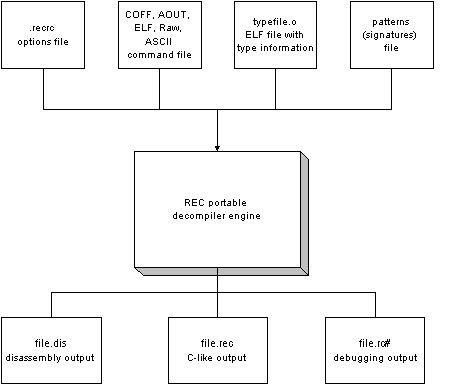
The minimum input to REC is the binary executable file. For example:
rec file.exe
If file.exe is in one of the recognized formats, it will be read, and a file.rec will be produced using the default options, without further intervention from the user.
However, since decompilation is a very difficult process, the more additional information can be provided by the user, the better the output.
For example, alternative algorithms could be selected, based on the compiler used to compile the executabile file, or based on readability or output preferences. To change any of the default options, the content of the file .recrc (rec.cfg on MSDOS and Windows) is read. Each line in this file contains an option, as if that option was entered on the command line. For example, if you always want REC to start in interactive mode and to always print numeric constants in hexadecimal, use the following lines in the .recrc file:
+interactive
+hexconst
These options can be overridden by command line options. For example, to run REC in batch mode even though the .recrc has a +interactive option, invoke REC with the following command line:
rec -interactive file.exe
Command Files and handling unrecognized formats
The input file could be in a format not yet recognized by REC. In this case, REC has no knowledge of which areas of the file contain data, which contain code and which contain auxiliary information. In this case, REC can be given this information in an ASCII file, called a command file. In this command file, a lot more inforamtion can also be provided, including predefined types, addresses of functions and configuration options. For example, REC could be invoked with the following command line:
rec file.cmd
where file.cmd has the following content:
#!wrec
option: +hexconstfile: file.exe 0x50 0x53
region: 0x80100000 0x801009b4 0x800 data
region: 0x801009b4 0x8010c1e8 0x11b4 text
region: 0x8010c1e8 0x80120800 0xc888 datasymbol: 0x80107fe0, 0x80108077 T CrearImage()
symbol: 0x80108078, 0x801080d7 T LoadImage(char *, int, int)
symbol: 0x801080d8, 0x8010813b T StoreImage()
symbol: 0x8010813c, 0x801081ff T MoveImage(char *, int, int)patterns: libmips.pat
The file starts with a magic-id : #!wrec. This must be on the first line. Each line contains one command followed by a colon sign (:) and by some arguments. Comments are preceded by a '#' character. The remainder of the line after the '#' is ignored.
Each of the option: command sets one of REC's options. These options override those provided on the command line.
The file: command specifies the binary file to be loaded. There should be only one file: command. After the file name, the magic argument specifies an optional identifier that must be present at the beginning of the file (magic number).
The region:
commands specify the layout of the binary file. The arguments
are the start and end memory address at which the code and
data will be loaded into memory, and the file offset where
the section starts. Note that no actual loading occurs. The
addresses are only used for informational purposes (they must
be correct for call statements to be meaningful). The last
argument is the region type, and affects the operation
performed on the content of the region. Only text regions are
considered for decompilation. Data regions are scanned to
find ASCII strings and generic pointers.
In the example:
region: 0x80100000     0x801009b4     0x800     data
        start addr      end addr      file      region
                                      offset    type
The symbol: commands specify starting and ending addresses of functions, along with a symbolic name and possibly a list of parameters for the function. The ending address is optional, and can be computed by REC automatically (see later). Also the ANSI-C style prototype is optional, and actually its use is discouraged, as types should be defined in a type file (see the types: command later). It is better to simply specify that the symbol is a function by adding ( ).
The patterns: commands specify one or more files containing a list of hex strings (pattern) and symbolic names. REC will search in the executable file for each pattern, and when found, it will assign the symbolic name associated with the pattern to the address where the pattern begins. The following is an example of a pattern file:
open() size: 16
A0 00 0A 24 08 00 40 01
00 00 09 24 00 00 00 00
;
lseek() size: 16
A0 00 0A 24 08 00 40 01 01 00 09 24 00 00 00 00
;
...
Each pattern can be up to 256 bytes. These patterns are sometimes called signatures in the literature. The size: option tells REC how many bytes the function occupies in the binary file. For example, you can specify a 16 bytes pattern for a 3000 bytes function.
The types: commands specify one or more ELF files with STAB symbolic information. This file is read to get predefined types and function prototypes. To create a types file, you can simply use Linux' system compiler (or gcc on a Solaris system) with the -g option. For example, to let REC know the types of the functions defined in the string.h header file, you can compile the following C source with the command line "gcc -g -c string.c":
/* string.c - types defined by string.h */
char *strcmp(const char *s1, const char *s2) { }
char *strncmp(const char *s1, const char *s2, int len) { }
char *strcpy(char *dst, const char *src) { }
char *strchr(const char *, int ch) { }
....
REC will add the prototype information to the symbols specified by the symbol: commands or to those found by the patterns: command. The actual code for the compiled functions is ignored, as well as their addresses. Note that the compiler will not generate symbolic information for functions that are not defined in the file, hence the { } at the end of each function.