
NeatPad v2.0
Written by anTiHerO
|
Introduction |
Protection: Registration
About: What is NeatPad?
First
of all, it's very flexible and powerful text editor. Why would you need another
text editor? Because NeatPad has everything you could possibly want at your
fingertips to design a web page!
It was created for editing text, or ASCII, files. These files contain no images
or special formatting, just like the content of a .html file.
NeatPad
has some awesome features, which include:
·
Built-in FTP Uploader for your web files (images and html files)
· Program
Launcher, to keep all your important programs at your fingertips
· HTML
Highlight, which turns HTML tags red so they stand out
·
Explorer-looking file tree, for quickly switching between files
·
"View in Browser", a feature that saves the HTML document
you're working on and shows it to you on a web page
·
Favorites Folder for files you regularly access
·
Built-in Notebook that allows you to keep notes to yourself while
working on a project
·
Multiple File Replace, which makes changes to an entire group of files
for you
· URL
Catcher, which allows you to surf and create a web page of the sites you really
like
·
Unlimited File Size; no more "this file is too big for notepad to
open..."
· Quick
insert tags, for the HTML tags you use the most
· And, most importantly, it's SMALL and FAST!
There is no pause to wait until a file is opened!
· - And more...
· NeatPad
will quickly become your Notepad replacement, as you begin to fall in love with
its quick-access features. Also, you can easily associate NotePad with
different file types.
· NeatPad's motto is "what you want is
what you get." This is because the text remains just as you type it.
NeatPad doesn't add any of its own special formatting to your text. Other HTML
editors, such as FrontPage, are "what you see is what you get," since
they might make your web page, but they add a whole bunch of HTML code to the
document that it doesn't even need. Other HTML editors can also cause counters,
banners, etc. to not work. Perhaps you've had these problems yourself. This
won't happen to you if you write the code yourself using NeatPad!
|
Tools required |
Debugger (eg Softice or TRW2000)
Half a brain
|
Target's URL |
http://neatpad.hypermart.net
|
Essay |
Before
we start, It has to be said that the protection on this program is awful! It
took all of 20 seconds to find the real
serial, hence the shortness of this tutorial.
OK,
first we need to find where we enter our registration code that we have
purchased from the authors! So, start-up the program, and we instantly see that
it isn’t in our usual help menu. If we have a look around, we will find it in
our File/Preferences option.
The
next thing you should notice, is that your username is already there, and
cannot be changed. (It uses the username that you give when you installed
windows!).
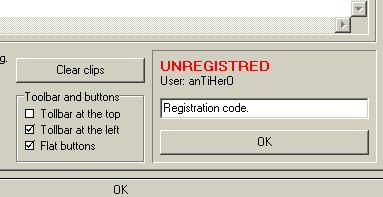
So
now, to the job in hand, finding our real serial! Enter any old serial number
into the registration box, and before you hit OK, bring up your debugger
window. As usual we will be setting our breakpoint on the HMEMCPY function. So,
in our debugger window we set the breakpoint by typing;
:bpx hmemcpy
This
will cause the program to break when something is written to memory. Now, close
your debugger window (you should know how to do this by now!), and hit the ok
button on our registration box. Bang! Up pops our debugger window. So firstly
clear all breakpoints that have been set by typing bc ( or bc* if your using
Softice ), and you will notice that the breakpoint we set on hmemcpy has broken
the program at KernelHmemcpy. We don’t want to be here, so we need to trace
through the Kernel, User, and Kernel32 code before we are inside our program
code. Trace through the code, using F10, until you get to the following;
0187:0047D220
CALL 00420034
0187:0047D225
MOV EAX, [EBP-14] < Move our fake serial into EAX
0187:0047D228
MOV EDX, [0049BD40] < Move the real serial into EDX ----------------------------Type D EAX to display fake serial.
0187:0047D22E
CALL 00403E54 < Compare real serial against fake
serial
--------------------Type D EDX to see real serial.
0187:0047D233
JNZ 0047D241
< If serials are different, jump to “Bad Cracker”, if same carry
on to “Good Boy”
So,
you should have written down the values displayed when we dumped the contents
of the EDX register to the screen, and now is the moment of truth. Close down
your debugger, and enter the values that you wrote down a few seconds earlier
into the registration box, which in my case is;
Right!
Hit the OK button, and what do we see?
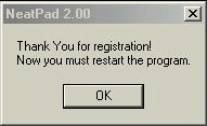
YES!!
Our job is done! If we do as asked, and restart the program, and go back to the
Files/Preferences section where we entered our registration information, we now
see the following;
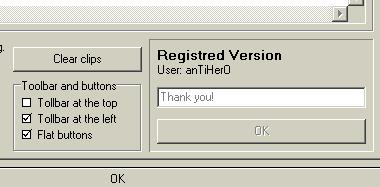
See!
I told you the protection on this program was terrible!!
|
Final Notes |
Pat
yourself on the back, grab a beer and a cigar, and relax, safe in the knowledge
that you just learnt something usefull!!
My Greetz Goes to:
[T]urb0z
– For introducing me to these infernal machines
The
TRES2000 Crew
My mum
When
ever there is a door,
there is an entrance.
And behind an entrance can no secret hide,
when a cracker takes his knowledge for a ride
McCodEMaN
ObDuh
|
The
information in this essay is for educational purpose only!
You are only allow to crack, reverse engineer, modify code and debugg programs that
you legaly bought and then for personal use only!!
To ignore this warning is a criminal act and can result in lawful actions!
So please note!
I take no responsibility for how you use the information in this essay, I take
NO responsibility for what might happen to you or your computer!
You use this information on your own risk!!
What I mean is: Please buy the software!
Essay written by anTiHerO ©TRES2000. All Rights Reserved.